
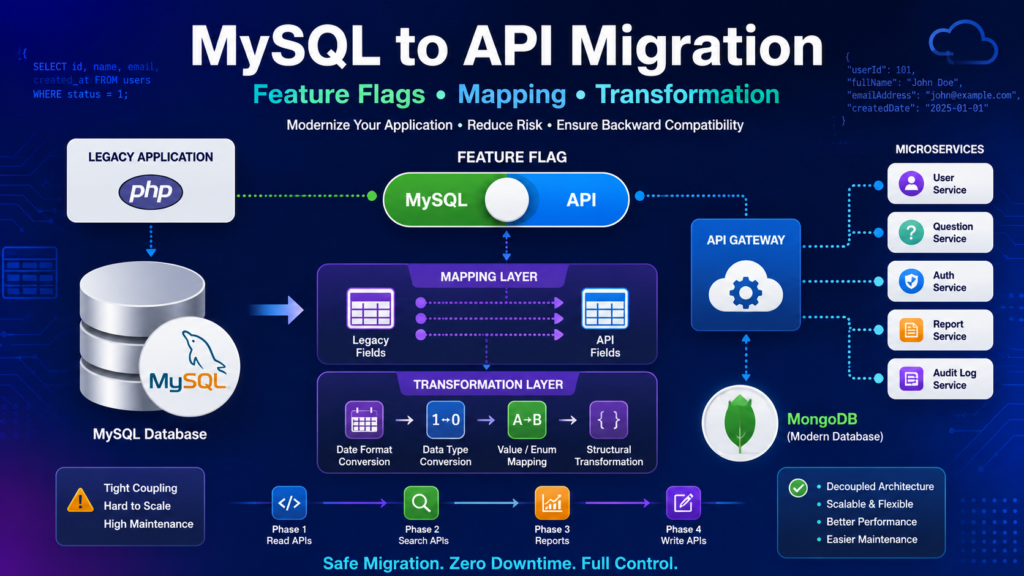
As organizations modernize their applications, one common architectural change is replacing direct MySQL database access with API-driven services. A successful MySQL to API migration using feature flags, mapping, and transformation layers helps organizations move toward scalable microservices without disrupting existing business operations.
Many legacy PHP, Laravel, Drupal, and enterprise applications directly interact with MySQL databases. While this approach works initially, it often becomes difficult to maintain, scale, and evolve. Modern architectures prefer exposing data through APIs, allowing services to own their business logic and data access.
However, migrating an entire application overnight is risky. This is where feature flags, mapping layers, and transformation layers become critical. They allow teams to gradually move traffic from MySQL to APIs while ensuring backward compatibility.
In this guide, we’ll explore migration patterns, feature flags, mapping strategies, transformation techniques, architecture diagrams, and real-world implementation examples.
Why Move from MySQL to APIs?
Traditional architecture looks like this:
Frontend
   |
PHP Application
   |
MySQL Database
Every module directly communicates with the database.
This creates several challenges:
- Tight coupling between application and database
- Difficult database migrations
- Complex scalability issues
- Duplicate business logic
- Limited flexibility for microservices adoption
- High maintenance costs
Modern architecture shifts data access through APIs:
Frontend
   |
PHP Application
   |
API Service
   |
Database
Benefits include:
- Better scalability
- Centralized business rules
- Easier maintenance
- Improved security
- Independent deployments
- Better observability
- Microservices readiness
Understanding Feature Flags
Feature flags are configuration switches that determine which implementation should execute.
During migration, a feature flag decides whether data should come from:
- Existing MySQL implementation
- New API implementation
Example
if ($useApiFlag) {
    return $apiService->getQuestions($paperId);
}

return $mysqlRepository->getQuestions($paperId);
This allows teams to:
- Roll out gradually
- Test in production
- Roll back instantly
- Reduce deployment risks
Migration Architecture Overview
Existing Architecture
Frontend
    |
PHP Application
    |
MySQL
Frontend
    |
PHP Application
    |
Feature Flag
   / \
  /   \
MySQL  API
Final Architecture
Frontend
    |
PHP Application
    |
API Gateway
    |
Microservices
    |
Databases
Common Migration Patterns
1. Strangler Fig Pattern
The Strangler Fig Pattern is the most widely used migration strategy.
Instead of rewriting the entire system, functionality is gradually replaced module by module.
Process
- Legacy system remains active.
- New API endpoints are developed.
- Feature flags route traffic.
- Old MySQL logic is removed.
Benefits
- Lower risk
- Continuous delivery
- Easier testing
- Incremental modernization
2. Parallel Run Pattern
In this approach, both systems operate simultaneously.
Flow
Request
   |
   |
MySQL
   |
Compare
   |
API
Example
$mysqlData = $mysqlRepository->getUser($id);
$apiData = $apiService->getUser($id);

if ($mysqlData != $apiData) {
    logger()->error('Mismatch found');
}
Benefits
- Validation before cutover
- Safer migration
- Better confidence
3. Read-First Migration Pattern
Reads are migrated before writes.
Migration Order
- Read APIs
- Search APIs
- Reports
- Write APIs
Why?
Because read operations are generally safer and easier to verify.
4. Dual Write Pattern
For write operations:
saveToMysql($payload);
sendToApi($payload);
Both systems receive updates.
Advantages
- Data consistency verification
- Easy rollback
Challenges
- Duplicate writes
- Retry handling
- Monitoring complexity
Data Mapping Layer
One of the most important parts of migration is Data Mapping.
Legacy database structures rarely match new API contracts.
Example
MySQL Response
{
  "id": 1001,
  "name": "Shubham",
  "email": "user@example.com"
}
API Response
{
  "userId": 1001,
  "fullName": "Shubham",
  "emailAddress": "user@example.com"
}
Mapping Table
| MySQL Field | API Field |
|---|---|
| id | userId |
| name | fullName |
| emailAddress |
Without mapping, the frontend may break.
Mapper Layer Example
class UserMapper
{
    public static function mapApiResponse($data)
    {
        return [
            'id' => $data['userId'],
            'name' => $data['fullName'],
            'email' => $data['emailAddress']
        ];
    }
}
Benefits:
- Backward compatibility
- Cleaner architecture
- Easier testing
- Reusable logic
Data Transformation Layer
Mapping connects fields.
Transformation changes data formats.
Example 1: Status Conversion
MySQL:
{
  "status": 1
}
API Expected:
{
  "status": "ACTIVE"
}
Transformation:
$statusMap = [
  0 => 'INACTIVE',
  1 => 'ACTIVE'
];

$response['status'] =
$statusMap[$mysqlData['status']];
Example 2: Date Transformation
MySQL:
2025-01-01 10:20:30
API Format:
01-Jan-2025
Transformation:
$date = Carbon::parse(
   $mysqlDate
)->format('d-M-Y');
Example 3: Nested Object Transformation
MySQL:
{
  "user_id": 1,
  "user_name": "John"
}
API Format:
{
  "user": {
      "id": 1,
      "name": "John"
  }
}
Transformation Layer handles these conversions seamlessly.
Feature Flag + Mapping + Transformation Flow
A complete migration flow typically looks like:
Frontend
    |
PHP Application
    |
Feature Flag
    |
API Service
    |
Mapping Layer
    |
Transformation Layer
    |
Frontend Response
This ensures the frontend receives the exact structure it expects.
Real-World Migration Example
Suppose a Question Bank module currently reads data directly from MySQL.
Existing Flow
Question UI
    |
PHP Controller
    |
MySQL Query
Migration Flow
Question UI
    |
PHP Controller
    |
Feature Flag
    |
Question API
    |
MongoDB
Response Handling
API Response
      |
Mapper
      |
Transformer
      |
Legacy UI Format
This allows migration without changing the frontend.
Monitoring During Migration
Monitor these metrics carefully:
API Metrics
- Response time
- Throughput
- Error rates
- Timeout count
Business Metrics
- Data mismatches
- Missing records
- User complaints
Infrastructure Metrics
- CPU utilization
- Memory consumption
- Database load
- Network latency
Best Practices
1. Start Small
Migrate one module at a time.
Examples:
- User Service
- Audit Logs
- Question Bank
- Reports
2. Use Feature Flags Everywhere
Avoid hard-coded switches.
3. Create Dedicated Mapper Classes
Never mix mapping logic with business logic.
4. Log All Failures
Capture:
- API failures
- Mapping failures
- Transformation failures
5. Maintain Rollback Capability
Rollback should be as simple as:
USE_API=false
6. Add Automated Tests
Include:
- Unit Tests
- Integration Tests
- Contract Tests
- Regression Tests
Internal Links
You may also read:
- Building Scalable REST APIs in PHP
- Laravel API Best Practices
- Microservices Architecture Guide
- MongoDB Migration Strategy
- Feature Flag Implementation in PHP
External Resources
- Martin Fowler Feature Toggles
- Microservices.io Strangler Pattern
- AWS Microservices Architecture
- Google Cloud Application Modernization
Conclusion
Migrating from MySQL to APIs is a critical step toward modern, scalable, and maintainable software architecture. However, successful migrations require more than simply replacing database queries. Organizations must implement feature flags for controlled rollouts, mapping layers for schema compatibility, and transformation layers for data format conversion.
By using proven migration patterns such as the Strangler Fig Pattern, Parallel Run Pattern, Read-First Migration, and Dual Write Strategy, teams can gradually modernize applications while minimizing risk. Combined with proper monitoring, automated testing, and rollback mechanisms, these techniques enable smooth transitions from legacy MySQL-based systems to modern API-driven architectures.
Whether you’re migrating a PHP application, Laravel platform, Drupal CMS, Question Bank service, Audit Log module, or an enterprise microservices ecosystem, feature flags, mapping, and transformation layers provide the foundation for a safe and successful migration.